
A website relaunch is always an intervention in an existing search system. URLs change, content gets merged, technology is replaced, internal links move, tracking is rebuilt — and search engines need to understand the new structure. That does not mean a relaunch has to damage organic visibility. It means that launching without an inventory, redirect plan, canonical checks, sitemap and monitoring is a bet on luck.
The reassuring part is in Google's own documentation on site moves: migrations are an established, controllable process. The checklist below is intentionally operational and aligned with current Google Search Central guidance (as of June 2026).
Inventory first, redesign second
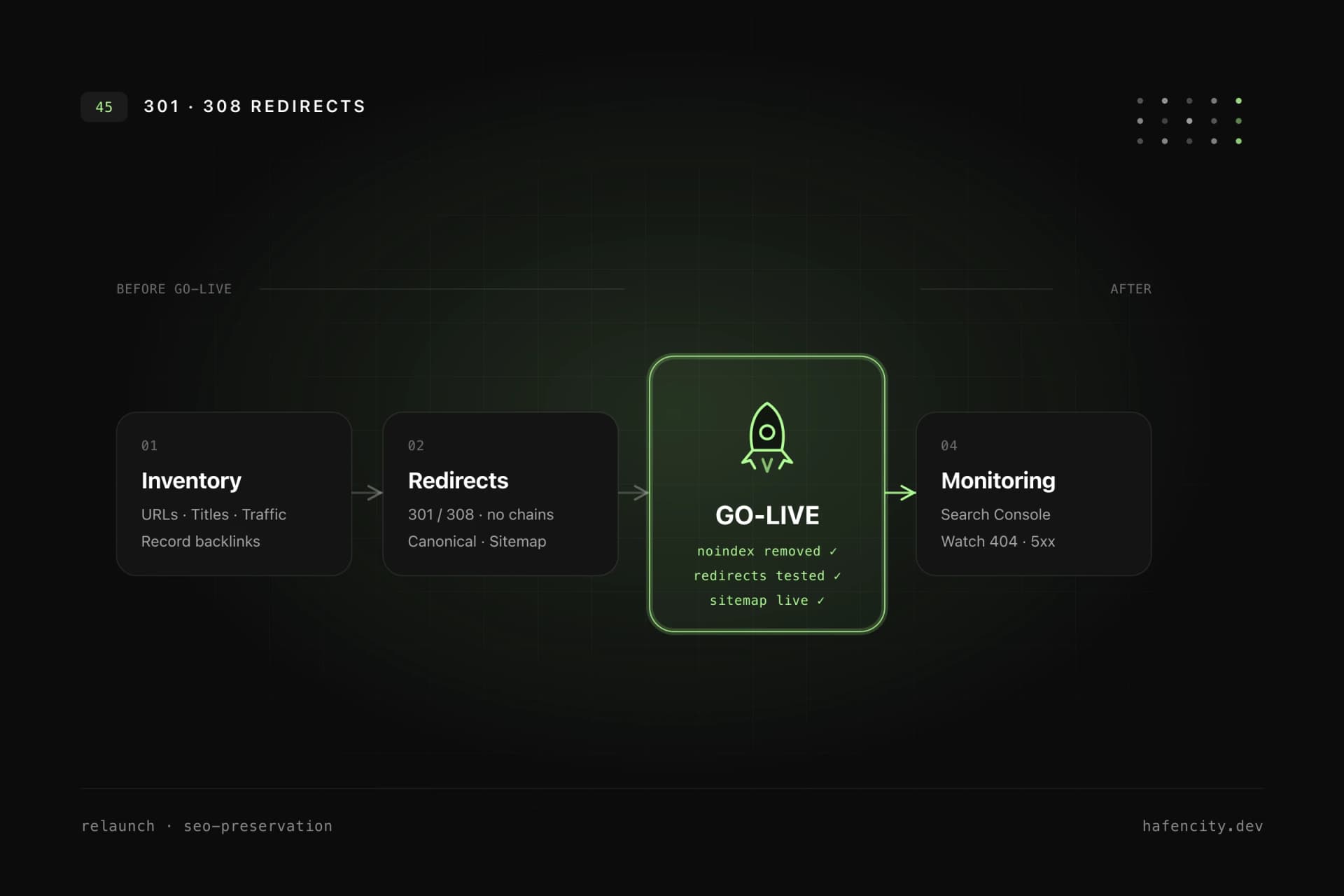
Before a single template is built, you need to know what exists and which signals it carries. Every relevant existing URL should be recorded before deciding what stays, what moves and what gets removed. A relaunch inventory should include at least the current URLs from crawls, sitemap, analytics and Search Console, the title and H1 structure, organic landing pages with traffic and conversions, pages with backlinks or local visibility, and the existing status codes, canonicals and redirects.
The most common mistake is recording only the pages visible in the main navigation. Many SEO-relevant URLs sit deeper: old landing pages, blog posts, case studies, PDF files, campaign URLs or localized variants. Those pages often carry backlinks — and they are the first to be forgotten in a redesign. The relaunch itself then follows a clear sequence that ends with stable rankings, not at deployment.
Redirects are the most critical lever
Redirects decide whether the signals you built up survive or get lost. Every old URL needs a clear decision: a one-to-one redirect to the direct equivalent, a topical redirect to a closely related new page, a deliberate 410/404 for content that is intentionally gone, or "no change" when the URL stays live. Blanket redirects to the homepage are the most expensive mistake — users and search engines lose context.
For permanent changes, server-side 301 or 308 redirects are the right choice. According to Google Search Central, the indexing pipeline uses permanent redirects as a signal that the target URL should become canonical — temporary codes (302/307) do not. Redirects should also point straight to the final destination, not through chains such as old → intermediate → new.
| Status | Meaning | SEO signal | Use in a relaunch |
|---|---|---|---|
| 301 / 308 | moved permanently | target becomes canonical | URL permanently replaced |
| 302 / 307 | temporary | no consolidation | short-term redirect only |
| 404 | not found | stays indexed for a while | accidentally dead URL |
| 410 | gone | deindexed faster | intentionally removed content |
A redirect plan is not a spreadsheet for the archive. It needs to be tested before launch: old top URLs, URLs with backlinks, old sitemap URLs and common variants with or without trailing slash, with or without www, HTTP and HTTPS. And it needs to stay: Google recommends keeping permanent redirects active for at least one year, ideally indefinitely.
Canonical domain, sitemap and internal links
A relaunch is the right moment to unify all domain and URL variants consistently. A website should answer unambiguously whether https://example.com or https://www.example.com is the preferred host, whether HTTP cleanly redirects to HTTPS, and whether trailing slashes, capitalization or parameters create duplicates. Canonical tags signal the preferred variant but do not replace redirects when old URLs are permanently retired. On multilingual sites, hreflang, canonicals and language paths must agree.
After the relaunch, the XML sitemap should contain only indexable, canonical, successful URLs — no redirected, noindex or staging paths. robots.txt must point to the correct sitemap and must not block important CSS, JS or image resources. Crucially, the new site should link internally straight to its final URLs and not rely on redirects to reach old targets. Redirects are for external legacy traffic, not for your own navigation. For how technical hygiene, performance and load time connect, see our piece on Core Web Vitals and performance.
Tracking and Search Console belong in the preparation
SEO loss is often noticed late, once tracking was broken during the relaunch. Before go-live, clarify which analytics properties remain in use, which events, conversions and consent settings carry over, and whether forms, clicks, downloads and bookings are still measured. Are internal IPs, staging domains and test traffic filtered? Do UTM parameters and campaign attribution still work? Document every change to the measurement logic — otherwise it is hard to tell later whether a drop came from SEO, technical behavior, consent or measurement.
Search Console is not a reporting tool for later, it is part of the preparation. Before: verify the property for the canonical domain, secure access, export performance data, document old top pages and queries. After: submit the new sitemap, test important URLs with the URL Inspection tool, watch indexing, 404 and redirect errors. For a true domain move, add the Change of Address tool; for a relaunch on the same domain it is not needed.
Protect staging, test the launch, watch the first weeks
Staging environments are a common source of problems — they must not be indexed, yet they have to be realistic enough to test. Sensible protections include password protection or IP restriction, no public links to staging URLs, no staging entries in sitemaps and no production canonicals pointing to staging. If noindex is used as protection, it needs a clear removal step before go-live. That forgotten noindex is one of the most common and most expensive relaunch mistakes.
Shortly before launch, a short acceptance checklist helps: Is noindex removed? Are canonicals set to production? Is the sitemap live? Are analytics IDs correct? Do redirects work on the real domain? After go-live: test old top URLs for correct redirects, check new pages for 200 status, submit the sitemap, verify real-time data. Over the following weeks, check 404 and 5xx errors daily at first, fix redirect chains and watch Search Console coverage. Google notes that reindexing can take a few weeks and that larger sites take longer — so short-term volatility is normal. The critical problems are systematic patterns: many old URLs without a target, new pages with noindex, wrong canonicals or broken tracking. The same discipline we bring to relaunches in Hamburg applies here: quality is measurable, not a matter of taste.
Next steps
Three questions clarify how low-risk your relaunch really is:
- Inventory: Is there a complete URL inventory including deep pages, backlinks and conversions — or only the menu structure?
- Redirects: Is there a deliberate decision for every old URL (one-to-one, topical, 410/404, unchanged) and a test before go-live?
- Measurability: Are tracking, consent and Search Console verified before launch, so you can immediately interpret any drop?
If you can answer "yes" three times, you launch with a plan instead of luck. Unsure about an upcoming move? We plan and support relaunches technically, from the inventory to post-launch monitoring. Take a look at our web development or book an intro call.