
AI coding has become part of daily agency work. According to the Stack Overflow Developer Survey 2025, 84% of developers use or plan to use AI tools — yet trust in their accuracy is falling, and only about a third still consider the output reliable. A controlled study by METR even found in 2025 that experienced developers using AI tools were on average 19% slower — even though they felt faster.
For an agency, the lesson is not "avoid AI" but "embed AI in a process". Codex, Claude and Cursor deliver real value — but only with discovery, small tasks, tests, human review and clear accountability. This article shows what the tools are each good at, what they cost, and what a workflow that holds up looks like in software development and AI integration.
What Codex, Claude and Cursor are each good at
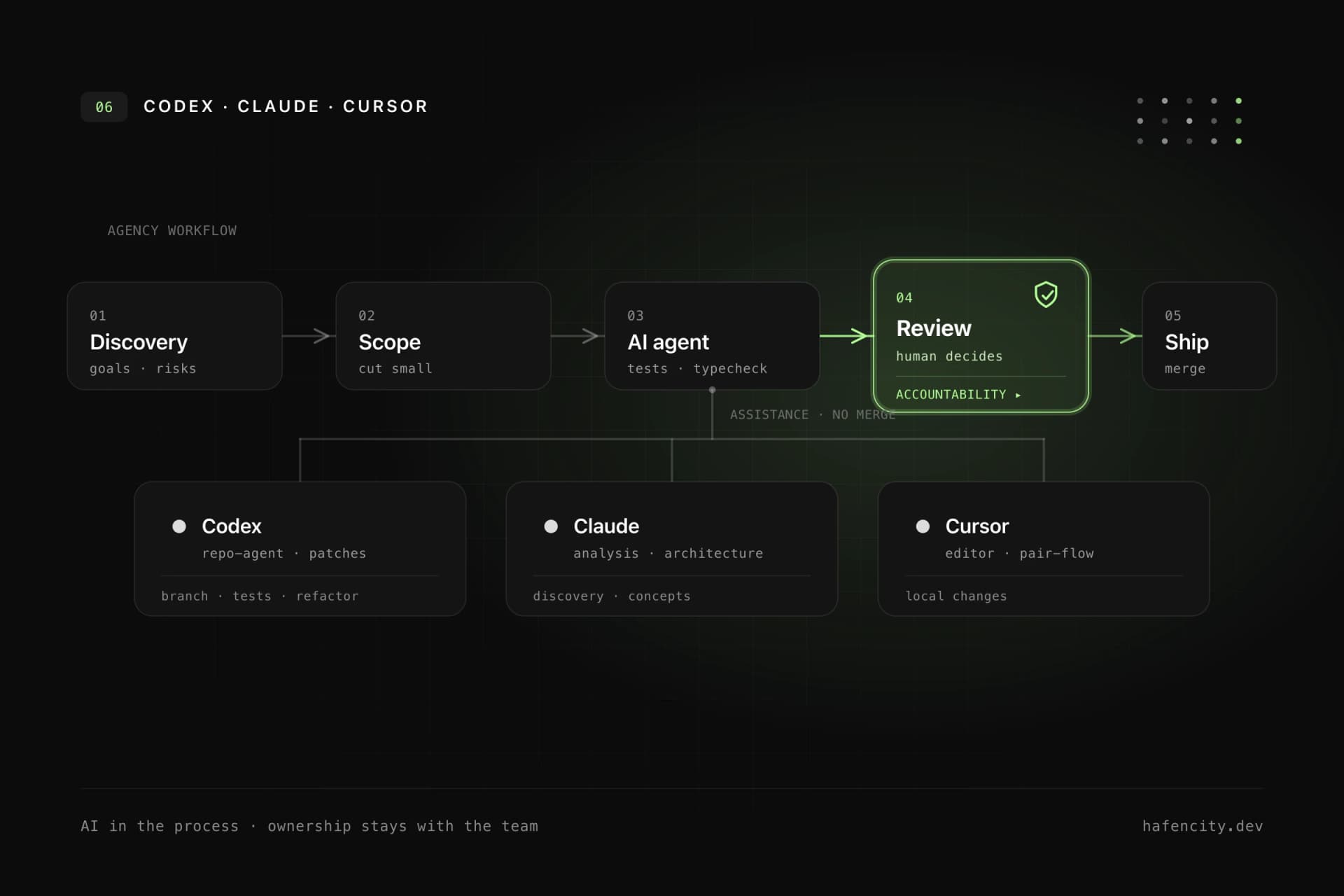
The three tools overlap a lot, but feel different in daily work. They are assistants, not decision-makers — accountability stays with the team.
OpenAI Codex is strong when an agent should work inside a repository on its own: read files, make changes, run tests, analyze failures and prepare a traceable patch. The CLI is free and runs through the ChatGPT sign-in; under the hood it uses the GPT-5 Codex models. That fits well-scoped tasks such as bug fixes, refactoring, migrations or tests.
Anthropic's Claude Code is often helpful for analysis, technical discussion, architecture questions and reasoning through larger contexts — and is used as a coding agent too. It runs on Claude Sonnet 4.6 and Opus 4.8. Cursor, in turn, is an AI editor (a VS Code fork from the company Anysphere, valued at $9.9B in June 2025) and most useful right in the development flow: navigating, editing individual files, explaining existing logic.
| Tool | Typical strength | Useful agency workflow |
|---|---|---|
| Codex | Agentic repository work | Branch tasks, tests, refactoring, PR preparation |
| Claude Code | Analysis and structured reasoning | Discovery, architecture, risk analysis, agentic work |
| Cursor | Editor-native development flow | Pair programming, local changes, understanding existing modules |
What the tools cost
Entry is cheap, full-time use is not necessarily. All three tools start at around $20 per person per month, but scale up with usage.
| Tool | Entry | Higher tier | Billing |
|---|---|---|---|
| Cursor | Pro $20/month | Pro+ $60 · Ultra $200 | Seat + credits |
| Claude Code | in Claude Pro $20 | Max $100 (5×) · $200 (20×) | Plan quota or API |
| Codex | in ChatGPT Plus $20 | ChatGPT Pro from $100 | usage-based since April 2026 |
The message behind the numbers matters: the $20 list price says little about the real bill. Anyone working agentically all day — with several parallel tasks and long contexts — quickly reaches the higher tiers. So model your team's expected usage profile, not the entry price.
A workflow that holds up
The value does not come from "letting AI write code" but from a clear sequence. During implementation, the tools work best when tasks are small, verifiable and clearly bounded. "Build the dashboard" is too broad. Better: "Add a filter for active customers to the existing dashboard, do not change API contracts and add tests for empty results."
A robust sequence looks like this:
- run discovery with clear goals, risks and non-goals
- split the technical work into small tasks and bound the scope
- use Codex, Claude or Cursor with defined boundaries
- run tests, type checks and linting
- review the result with a developer — including privacy and business logic
- update documentation and decision notes, then merge
This process is not spectacular, but it is reliable. It makes AI part of professional software development instead of a shortcut around engineering. We covered how AI actually speeds development up in AI coding with Codex and Claude.
Code review and tests: the real lever
Teams that want to use AI seriously need tests and human review. Without tests, faster implementation becomes more manual verification work. With tests, an agent can move faster because incorrect changes fail earlier.
AI is useful in review for quickly scanning for obvious issues: missing tests, inconsistent naming, unclear error handling or possible edge cases. But it does not replace human judgment. An experienced developer checks other things: does the change fit the architecture? Do API contracts stay stable? Are permissions and tenant boundaries correct? This is exactly where the risk lives, because AI produces plausible-sounding explanations that are still wrong. In the 2025 Stack Overflow survey, 66% of developers named "almost right, but not quite" as their most common problem, and 45% said debugging AI code is more time-consuming. Which risks to manage along the way is shown in our piece on governance in AI software projects.
Data protection, GDPR and confidentiality
Data protection belongs at the beginning of the AI workflow, not the end. Agencies work with client data, business logic, credentials and private repositories. So before the first prompt, it should be clear which data may enter which tool.
In many cases it is enough to formulate tasks without sensitive data, use test data and keep secrets strictly out of prompts, logs and agent context. Add EU regions, a data processing agreement and a deliberate choice about which content must stay local. Regulated projects need documented processes, clear approvals and technical safeguards on top. How we think about privacy and architecture together is shown in our backend development.
Where AI helps — and where it doesn't
AI helps most when the work is clearly describable, verifiable and context-dependent — and is weak when the real problem is unclear. It cannot replace missing strategy or reliably fix poor requirements.
AI works well for:
- understanding existing codebases faster
- implementing boilerplate and recurring patterns
- adding tests for known rules
- summarizing pull requests and keeping documentation current
- speeding up failure analysis
AI is weak on unclear business models, missing product ownership, messy data without domain clarification, security decisions without context and legal judgments. Very new or heavily regulated requirements still need human expertise. AI can prepare, compare and check. The responsible team has to decide.
Next steps
Three questions settle sensible adoption faster than any tool duel:
- Tasks: can your work be split into small tasks and protected with tests?
- Privacy: which data may enter which tool — and what must stay local?
- Accountability: who reviews architecture, security and business logic before the merge?
Unsure how to embed Codex, Claude and Cursor cleanly into your development? We do this in client projects regularly — pragmatically and with an eye on quality and privacy. Take a look at our AI integration or book an intro call directly.