
AI coding is no longer a bet in 2026 — it's the norm. Per the DORA report 2025, around 90% of development teams use AI in their daily work. At the same time, trust is falling: in the Stack Overflow Developer Survey 2025, two-thirds of respondents name "almost right, but not quite" AI answers as their biggest frustration.
That contradiction is the heart of good AI work. The most important DORA finding isn't "AI makes you faster" but: AI amplifies what is already there. Teams with clear architecture, tests and reviews get markedly better. Teams without that base mostly get more code — and more problems.
What Codex and Claude Code can do in 2026
Codex and Claude Code are both mature coding agents — the difference is the ecosystem, not the core idea. OpenAI describes Codex as an agent that can read, modify and run code; it now runs on the GPT-5 family, whose latest coding models reach state-of-the-art scores on Terminal-Bench 2.0 per OpenAI. Anthropic's Claude Code works similarly — an agent in project context that edits files, runs shell commands and reasons through larger codebases, built on the Claude Opus, Sonnet and Haiku models.
On price the two are surprisingly close in 2026. Codex moved to token-based billing in April 2026; Claude Code bills via a subscription budget that refills every five hours.
| Tier | OpenAI Codex | Claude Code (Anthropic) |
|---|---|---|
| Entry | Free ($0), Go ($8) | included in Pro |
| Pro / month | Plus $20, Pro from $100 | Pro $20, Max $100–200 |
| Billing | token-based (since April 2026) | subscription, 5-hour budget |
| Team / Business | Business $20–25/user | Premium seat from $100/user |
| Models | GPT-5 family | Claude Opus, Sonnet, Haiku |
The numbers come from the official pricing pages (Codex, Anthropic, as of June 2026; list prices in US dollars, plus VAT in the DACH region). Which tool is cheaper depends on your usage profile — run many agents in parallel and in fast mode, and you quickly reach three figures per developer per month.
The real value sits in the system around it
AI coding pays off not at the keystroke but in the processes around it. The DORA report 2025 puts it plainly: AI is an amplifier. Over 80% of respondents report higher productivity, 59% see a positive influence on code quality — but around 30% have little to no trust in AI-generated code. Success depends less on the sophistication of the tool than on the strength of the surrounding systems: architecture, platform, workflows and knowledge base.
For companies that means: put AI on a weak base, and you mostly accelerate the volume of code — not the quality. How we think about speed and quality together in projects is shown in How AI accelerates software development.
The trust paradox: heavy use, little blind faith
High adoption meets falling trust — and that's healthy. In the Stack Overflow survey, 51% of professionals use AI daily, yet positive sentiment toward AI tools has dropped from over 70% (2023/2024) to around 60%. 66% name "almost right" output as their biggest annoyance, 45% say debugging AI code takes more time. And despite all the agent hype: 52% don't use agents yet, or only sporadically.
The right response isn't rejection but discipline. Every relevant AI output is a draft that must be verified — mechanically and by a human. Anchor that organizationally and you get far more out of the same tools. How to steer those risks cleanly is covered in Risks in AI software projects.
A professional AI coding workflow
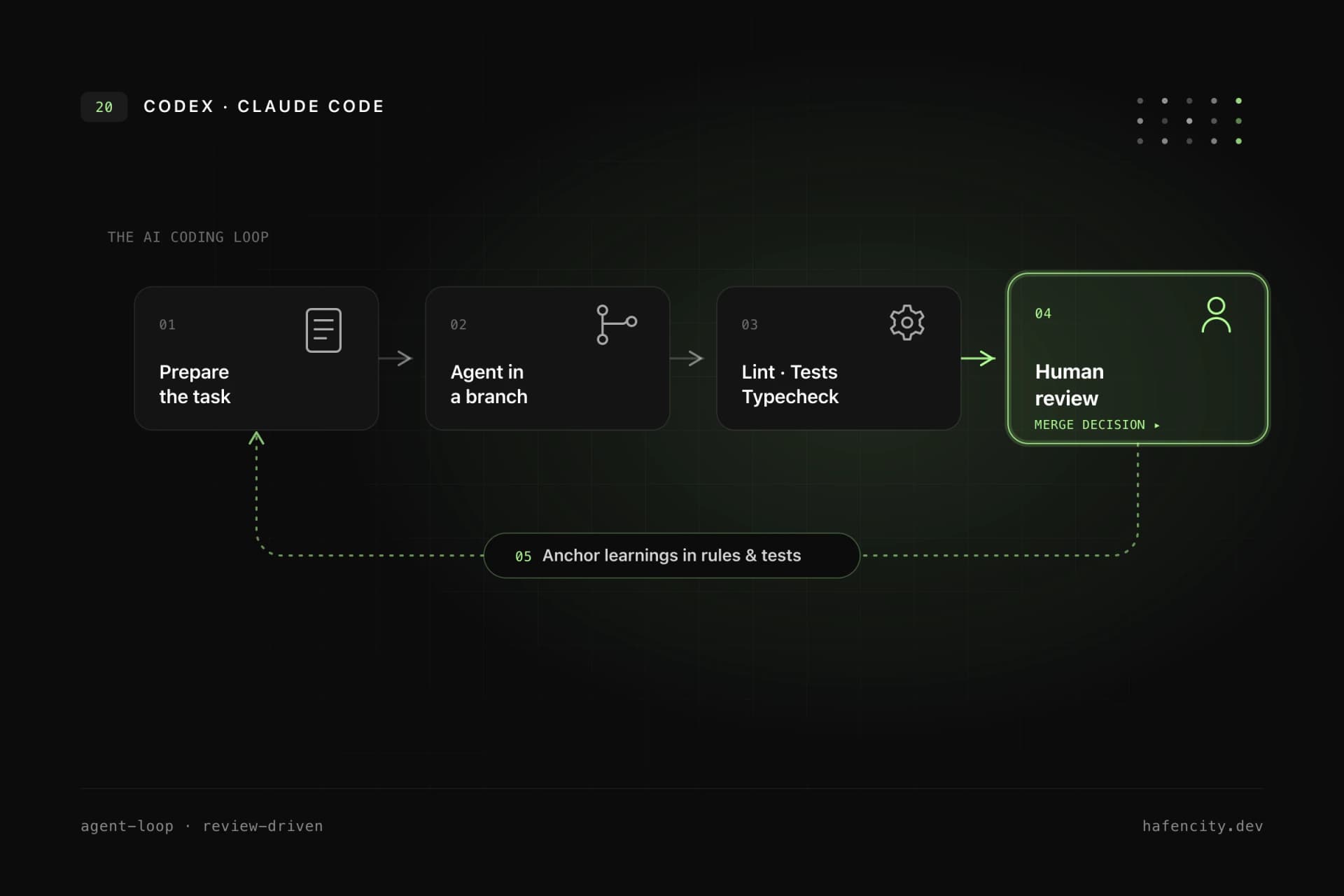
In client projects, AI coding works best as a structured loop. It's not the prompt that decides, but the frame before it and the verification after.
- Frame: before an agent starts, clarify the goal, non-goals, affected components and test strategy. This saves more time than fixing vague prompts later.
- Isolate: the agent works in a branch or workspace. For larger tasks, split responsibilities — one agent for tests, one for UI, one for backend behavior.
- Verify: lint, type checks, unit and E2E tests must run. AI code is not done because it looks plausible.
- Review: the human checks architecture, side effects, security boundaries, product logic and maintainability — not every line.
- Learn: put recurring mistakes into local rules, README files, test cases or agent instructions. The system improves with each task.
A good task isn't "build the feature" but: "Add server-side phone validation to the contact form, do not change email templates, add tests for empty and international numbers, and document the error message."
Codex, Claude or both? Governance beats brand choice
The more important question isn't "Codex or Claude" but how you control AI. Many teams will use several tools — Codex, Claude Code, Cursor or GitHub Copilot — because strengths and surfaces differ. For companies, these questions matter most:
- Which repositories and data may the tool access?
- How are secrets protected and changes made traceable?
- Is approval required before production actions?
- Does the tool fit cleanly into Git, CI and project management?
- Can results be verified with tests?
A tool that produces code fast but is hard to control creates new risk in the end. Which tools we combine in day-to-day agency work is described in more detail in Codex, Claude and Cursor in the agency.
Where AI coding creates value immediately
AI coding is strongest on tasks that are easy to verify. That's where speed comes without a quality risk:
- adding tests for existing behavior
- strengthening TypeScript types and cleaning up form validation
- updating API clients and writing migration notes
- fixing broken imports and build errors
- deriving documentation from code
Harder are tasks with unclear product strategy, deep domain logic or high security impact — payment flows, medical workflows or internal core systems. There AI can prepare, but it should not make the final call. "Vibe coding" is legitimate for prototypes; production systems need engineering discipline.
Next steps
Three questions decide how much you get out of AI coding:
- Base: how good are your architecture, tests and CI — the things AI amplifies?
- Control: are access rights, secrets and approvals for AI tools in place?
- Workflow: are AI results verified mechanically and by a human before they ship?
Unsure where to start? We regularly embed AI coding into client projects — as part of a clear AI strategy and professional software development. Let's use a short intro call to find where the biggest lever is.