
In 2026 Next.js is no longer one option among many — it is the de facto standard framework for React projects. According to W3Techs it runs on around 2.9% of all websites and is the most-used React meta-framework. With Next.js 16 — released in October 2025 — the App Router, stable Turbopack and the new Cache Components model have become the default.
That is why many companies look for a Next.js agency. The real question is rarely "which framework is the most modern?" but: is Next.js worth it for our project, or is it too large, too complex or simply unnecessary? The honest answer: Next.js is especially strong when public content, performance, SEO and product features meet. It is less convincing for a very simple site with no dynamic requirements, or an internal tool that gains nothing from server rendering.
What Next.js is in 2026 — and what it is not
Next.js is a React framework that closes the gap between UI and production operation. React describes the interface; Next.js adds routing, rendering strategies, build optimization, image and font optimization, metadata APIs and server features. With Next.js 16, Turbopack is the stable default bundler — per Vercel with 2–5× faster builds and up to 10× faster Fast Refresh. New is also Cache Components: an explicit caching model based on Partial Pre-Rendering that cleanly combines static and dynamic parts of a page. Underneath runs React 19.2, and new projects start with the App Router by default.
The distinction still matters: Next.js is not a ready-made CMS, not a complete backend and not a substitute for product strategy. It is a technical foundation. Whether that foundation becomes a fast, maintainable and discoverable product still depends on architecture, content, data model and operations. How we build that foundation in projects is shown in our web development.
When Next.js is worth it — and when it is overkill
Next.js is worth it when several product-adjacent requirements appear at once. In real projects that is the norm — and exactly where the framework shines:
- The site should be found organically in Google.
- Content, landing pages, blog or product pages matter.
- There are dynamic areas such as login, dashboard, customer portal or SaaS features.
- Performance and Core Web Vitals are business-relevant.
- The product is rolled out in multiple languages or markets.
- A headless CMS, a database or external APIs need clean integration.
Conversely, Next.js can be overkill: for a small static site with no complex content, a team with no React knowledge, an application entirely behind login (where SEO and server rendering do not matter), or when a no-code tool is sufficient. Then a website builder, a classic CMS or an admin framework is often faster and cheaper. Good technology decisions come from requirements, not framework preference.
Choose rendering per page type
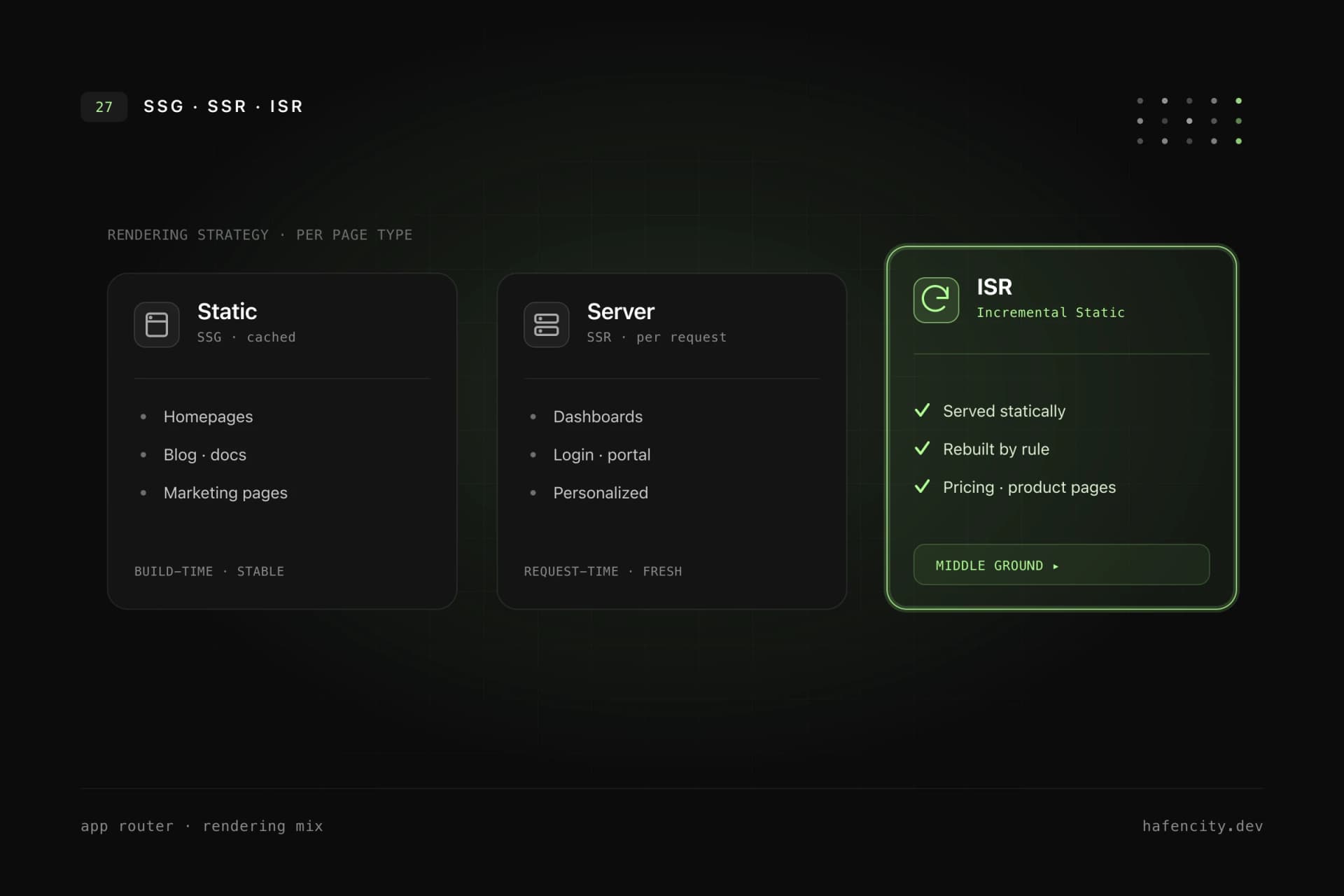
The real lever in Next.js is not "as much server as possible" — it is the right rendering strategy per page type. Within one project you can combine static, dynamic and incrementally updated pages without overcomplicating the architecture.
Static rendering builds pages at build time and serves them heavily cached — ideal for homepages, service pages, blog, case studies and documentation. Server rendering computes content per request and makes sense when it must be live or user-specific: dashboards, protected areas, search, cart. ISR and the new Cache Components serve static output but revalidate selectively by defined rules — a fit for pricing and product pages or large catalogs. The App Router makes this choice explicit, because in Next.js 16 dynamic code runs at request time by default and caching is opted into deliberately via use cache (details).
SEO and performance: strong base, not a guarantee
Next.js is a good SEO foundation because HTML is delivered from the server or statically — but that alone does not rank. Search engines do not have to wait for the browser to load a large JavaScript app first, and metadata can be set in a structured way. Still, SEO needs clear information architecture, content with search intent, unique titles, readable URLs, canonicals and hreflang for multilingual sites, and internal linking.
The same goes for performance: Server Components, static generation, image and font optimization and caching all help, but a Next.js site still gets slow if too many Client Components, heavy tracking scripts or unoptimized images end up in the bundle. Performance comes from architecture decisions and clear budgets, not from the framework alone. More on this in our piece on a website relaunch without performance and SEO loss.
What does a Next.js project cost in the DACH market?
Cost depends less on the framework than on scope — content depth, dynamic features, integrations and design. As orientation, we see three typical size brackets in the DACH market.
| Project type | Typical range (DACH, one-off) | What it covers |
|---|---|---|
| Marketing website | €8,000–20,000 | Content, SEO, multiple languages, CMS integration |
| Web app / customer portal | €20,000–50,000 | Login, dashboard, API integration, roles |
| SaaS MVP | €30,000–80,000 | Marketing + app + backend, billing |
These ranges are guidelines and align with current market overviews of web development costs in 2026; we go into more detail in website costs 2026. On top come ongoing costs for operations, hosting and maintenance. Investing early in architecture and content model means paying less later for rework — cheap solutions often get more expensive over their lifetime.
Vercel or self-hosting?
Vercel is the natural choice for Next.js, but not the only one. Because Next.js is built by Vercel, Preview Deployments, Edge Network, caching, Image Optimization and ISR work there with little configuration. The Pro plan costs $20 per seat per month including $20 of usage credit, with usage-based charges on top. Self-hosting can make sense when infrastructure, privacy, cost control or existing cloud standards require it.
| Option | Advantage | Effort / risk |
|---|---|---|
| Vercel | fast start, strong Next.js integration, Preview Deployments | platform dependency, review usage cost and compliance |
| Self-hosting | more control, integration into existing infrastructure | more DevOps effort, caching/ISR/CDN/monitoring must be planned |
| Static export | simple hosting for purely static sites | not all dynamic Next.js features are available |
For marketing websites, content platforms and many SaaS frontends, Vercel is often pragmatic. For companies with fixed cloud requirements, self-hosting can still be the better decision. The key is to clarify operations early — not shortly before launch. For product-adjacent server logic, a deliberate boundary helps: Next.js is strong for the web layer, while complex core processes often belong in a separate backend architecture.
Next steps
Three questions settle whether Next.js fits faster than any framework debate:
- Visibility: are there public pages that should be found organically, and are Core Web Vitals business-relevant?
- Dynamics: do you need product-adjacent areas such as login, dashboard, portal or multiple languages?
- Operations: is the team ready to plan rendering, caching and backend boundaries deliberately — on Vercel or self-hosted?
If most answers are yes, Next.js is a strong choice. Unsure whether it fits your project? We make this call in projects regularly — pragmatically and with an eye on roadmap and budget. Take a look at our web app development or book an intro call directly.