
Cheap software is attractive at first: a low fixed price, a quick start and something visible to show. The problem is not the price, but what it leaves out. According to the CISQ report "Cost of Poor Software Quality", poor software quality cost the US economy alone around 2.41 trillion dollars in 2022 – much of it from accumulated technical debt that nobody saw on the bill.
When budgets are tight or a market needs to be tested quickly, a lean start can still be the right call. It only becomes expensive when a low-cost solution is not treated as a prototype but gradually becomes a core system. At that point, teams pay back the saved cost later – through slow delivery, unstable releases, security risks, costly migrations and dependency on individual vendors.
Cheap versus cost-effective
Cost-effective means the scope is intentionally limited, quality matches the risk and the most important decisions are documented. Cheap often means the price is low because important work was skipped. The difference is almost invisible at the start.
A login screen, dashboard or order form can look good in a demo even if the underlying data model, APIs or components are fragile. The commercial question is therefore not only "What does the build cost?" but "What will it cost to run, extend and secure this software for the next three to five years?" That is exactly where a cheap fixed price parts ways with a cost-effective build.
| Dimension | Built cheap | Built cost-effectively |
|---|---|---|
| Tests | manual, ad hoc | automated for core workflows |
| Architecture | implicit, grown | deliberately modular, documented |
| Security | a later add-on | secure defaults from the start |
| Ownership | with the vendor/platform | code, data, infrastructure with the client |
| Operations | not planned | budgeted: hosting, updates, monitoring |
| Handover | credentials only | docs, deployment, architecture decisions |
The real bill is not in the quote
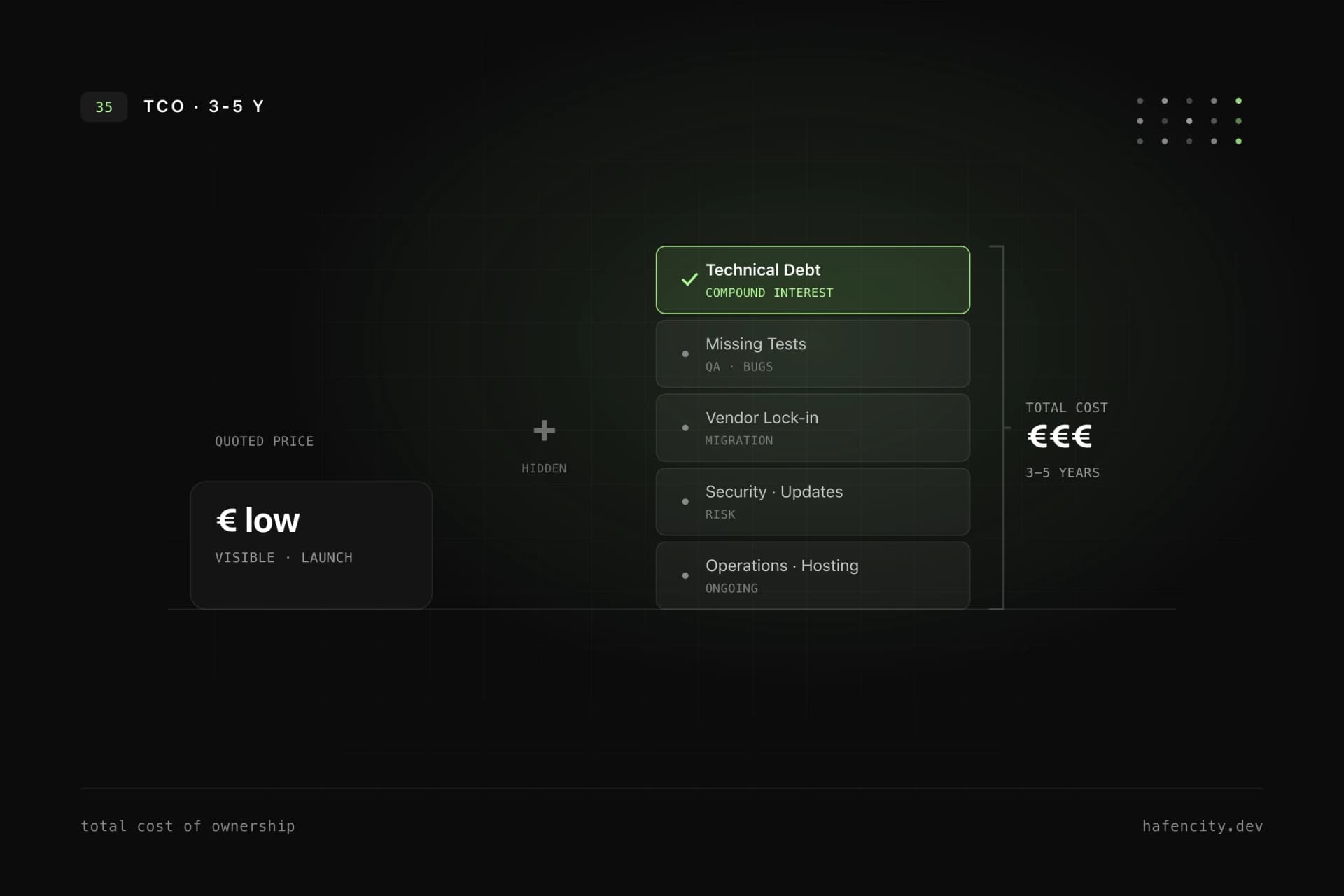
The quoted price is rarely the full cost – the total cost of ownership accrues over years. Software creates ongoing cost even when no new feature is built. Anyone who budgets only the build and ignores operation is comparing apples with half apples.
These recurring items belong in any honest budget:
| Recurring item | Typical driver |
|---|---|
| Hosting, database, storage | usage and traffic |
| Monitoring, logging, error analysis | system complexity |
| Updates for frameworks & dependencies | tooling release cycles |
| Security, backups, restore tests | data criticality |
| Maintenance, bug fixing, performance | usage intensity |
For context: specialised agencies in the DACH region typically charge €120–180 per hour in 2026, freelancers around €100 – roughly €700–900 per day. A markedly lower quote is usually not an efficiency gain but a sign that quality work is missing or that operation and further development are not priced in. How to plan maintenance and further development realistically is covered in software maintenance and further development.
Technical debt: the compound interest of development
Technical debt appears when fast solutions are traded for maintainability – and it accrues interest. A single workaround is harmless. Many workarounds without boundaries become a brake on growth.
According to McKinsey, CIOs estimate that technical debt amounts to 20–40% of the value of their entire technology estate; companies additionally tie up 10–20% of their budget for new products just to fix legacy issues. Every team knows the typical signs:
- new features take longer over time
- small changes cause unexpected bugs
- central logic is duplicated across the codebase
- data structures no longer match the business model
- nobody is sure which parts are still used
Technical debt is not always wrong. In a prototype, deliberate shortcuts can be sensible. It becomes dangerous when the debt is never made visible, prioritised or reduced. A sober software audit makes exactly this hidden item measurable.
Where the cost really sits: tests, security, lock-in
The most expensive gaps rarely sit in the first screenshot, but in tests, security and platform dependency. Three areas drive follow-up costs the hardest.
Missing tests make every later change riskier. Without automated tests, teams have to manually check whether login, payments, roles, imports or integrations still work. The result is longer QA phases, more production defects and a fear of refactoring – which makes software not only more expensive, but the business slower too.
Security is a classic blind spot in low-cost projects – not by intent, but because there is little time for threat modelling, permission design, secure defaults, dependency updates and logging. The more sensitive the data and workflows, the more expensive the retrofit. On top of that, since 28 June 2025 the German Accessibility Strengthening Act (BFSG) requires many digital products to be accessible, with fines of up to €100,000 for violations. A BFSG and WCAG checklist helps plan this early instead of retrofitting it expensively.
Vendor lock-in arises when data is hard to export, business logic exists only inside one platform, or licensing cost grows sharply with usage and team size. Lock-in is not always a deal-breaker – what matters is evaluating the dependency consciously and designing critical data and interfaces so a future migration remains possible.
When a cheap start is still the right call
Not every low-cost solution is a mistake – a small, fast approach can be exactly right when the risk stays intentionally low. For prototypes, click dummies, internal one-off tools, landing pages or market tests, speed often matters more than robustness.
A cheap start makes sense when the risk is intentionally low, no critical data is processed, the lifetime is limited, success criteria are clearly defined and the team understands which shortcuts were taken. The mistake is not starting lean. The mistake is turning a disposable prototype into a permanent business system without a technical reassessment. When the step to a tailored solution pays off is covered in our post on custom versus off-the-shelf software.
Before you decide: the honest checklist
Asking the right questions early does not eliminate cost – but it stops cost from staying invisible. Compare more than prices: compare long-term viability.
These six questions settle the long-term bill faster than any fixed-price comparison: Who maintains the software after launch? Are critical workflows covered by tests? How are security updates applied? Who owns the code, data and infrastructure? Is the architecture documented and a vendor switch possible? And what operating costs are realistic? A vendor who answers these clearly has already accounted for the follow-up costs.
Next steps
Before you commit to a quote, three questions help:
- Lifetime: is this a time-boxed experiment or a system that will still be business-critical in three years?
- Ownership: do you own the code, data and infrastructure – or are you tied to a platform?
- Operations: are tests, security, maintenance and hosting realistically priced in, or does the quote only cover the build?
Unsure whether a cheap offer fits your project or just defers the follow-up costs? We assess this in projects regularly – pragmatically and with an eye on roadmap and budget. Take a look at our software development or reach us directly via the contact page.